I quite enjoyed drawing the storyboards for the first two idents as i was able to express my ideas and see what worked and what didn't. Just from the two storyboards i could already see that one of the ideas was stronger than the other. The idea that i consider weaker is the bouncing television. I have no intention of changing the idea as i feel that its best to stick with it, especially with the time i have to complete it. Hopefully on completion of the idea i might be surprised by the outcome.
Overall the storyboard process has been pretty enjoyable, especially as i like drawing. It would have been better to have three ideas down on paper but the third is a work in progress.
Thursday, 16 April 2009

Week 3
In Week 3 i started to think of ideas for the three idents. Using inspiration from the mood boards i had made, i quickly came up with two ideas. The first idea was to create a city landscape where an old style television set would bounce off of the buildings. The second idea was to have the same television set skateboarding in a big E4 themed skate park. I found it harder coming up with an idea for the last ident so i continued with the two ideas i had for the time being.
These are two rough storyboards i did for the two ideas:


These are two rough storyboards i did for the two ideas:
Tuesday, 3 February 2009
Week 2
Choosing a channel.
At first i thought about producing three idents for the MTV channel but felt that there was a limit to the amount i could produce without the work looking like existing MTV idents.
I am pretty sure that the channel i want to use will be E4. I like the channel because it has a very modern look and appeals to a younger audience. I think there are a lot of possible ideas that i could pursue with this channel.

At first i thought about producing three idents for the MTV channel but felt that there was a limit to the amount i could produce without the work looking like existing MTV idents.
I am pretty sure that the channel i want to use will be E4. I like the channel because it has a very modern look and appeals to a younger audience. I think there are a lot of possible ideas that i could pursue with this channel.

The mood board above is what E4 represents in my opinion. In my opinion the channel is very focused on youth culture. Both the programmes and the identity focus very strongly on a teenage audience.
I created the mood board below to dipict the kind of audience E4 is aimed at. Again the whole mood board is very focused on youth.

Tuesday, 27 January 2009
Semester 2 Week 1
The brief for this Semester is to produce three idents for a TV channel. I have yet to come up with any ideas and haven't yet chose the channel that I wish to use. I think that the project is going to be challenging as it is the first time I have animated anything using 3Ds Max.
Class Activity
In class we were asked to think about the most memorable corporate ident that we had seen on TV.
I think that the msot memorable idents I have seen have to be the slug animations on BBC 3.
Click this link to view some examples of these idents.
http://uk.youtube.com/watch?v=1zccNjxOaEY
I think these idents are the most memorable for me as i find the animations quite amusing. The channel shows a lot of comedy so the idents reflect this perfectly.
Class Activity
In class we were asked to think about the most memorable corporate ident that we had seen on TV.
I think that the msot memorable idents I have seen have to be the slug animations on BBC 3.
Click this link to view some examples of these idents.
http://uk.youtube.com/watch?v=1zccNjxOaEY
I think these idents are the most memorable for me as i find the animations quite amusing. The channel shows a lot of comedy so the idents reflect this perfectly.
Tuesday, 20 January 2009
Week 12
In Week 12 I had nothing left to do other than check over my work. With the designs all finished I decided to check the parameters and properties of the images and altered them when necessary to achieve the best possible results.
Overall I feel that the project has been a success. I have managed to produce three images that I feel are of a fair standard. The final images have turned out as planned and are good representations of the original skecthes.
Week 11
This image shows the final scene for the month of November. I have re-worked the people in the crowd and have added the fireworks background.
The background was created using Adobe Photoshop. I took multiple images of fireworks and cut them all into one image. I also changed the colours to fit in with the rest of the scene.
 I re-worked the crowd by adding more detail to the figures. The image below shows where i have used soft selection to model the heads of the models. Starting with a sphere i then pulled out and depressed parts of the shape to achieve a rough head shape. The main areas of detail are the mouth, eyes, nose and the hat.

The background was created using Adobe Photoshop. I took multiple images of fireworks and cut them all into one image. I also changed the colours to fit in with the rest of the scene.
I re-worked the crowd by adding more detail to the figures. The image below shows where i have used soft selection to model the heads of the models. Starting with a sphere i then pulled out and depressed parts of the shape to achieve a rough head shape. The main areas of detail are the mouth, eyes, nose and the hat.A lot of the November image was created via means of experimentation. I like the look of the image although it may not be the most technical of the three scenes. I am a lot happier with the final outcome of this particular scene as i was worried originally that i would not be able to create a convincing image.
Week 10
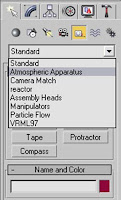
To create the fire i used a Sphere gizmo. These can be found by selecting the helpers icon. Once selected there is a drop down menu where you need to choose the Atmospheric Apparatus option.
This week i have drawn up a table to show you step by step how to create the fire. Click on the table to view it in a larger scale.

This week i have drawn up a table to show you step by step how to create the fire. Click on the table to view it in a larger scale.


Subscribe to:
Posts (Atom)